---
title: AI Project Insights
description: Get instant, actionable insights into your projects with a single click. Save time writing reports with an AI-generated executive summary, keep your projects on track with real-time risk analysis and more.
---
[Skip to content](https://learn.projectmanager.com/ai-project-insights#main-content)
- [English](https://learn.projectmanager.com/ai-project-insights)
- [Español](https://learn.projectmanager.com/es/ideas-de-proyecto-de-ia)
English
Show submenu for translations
[Ask a Question](https://learn.projectmanager.com/kb-tickets/new)

- [ProjectManager Knowledge Base](https://learn.projectmanager.com/)
Open main navigation
Close main navigation
- [ProjectManager Knowledge Base](https://learn.projectmanager.com/)
- - [English](https://learn.projectmanager.com/ai-project-insights)
- [Español](https://learn.projectmanager.com/es/ideas-de-proyecto-de-ia)
English
Show submenu for translations
- [Ask a Question](https://learn.projectmanager.com/kb-tickets/new)
How can we help you today?
- There are no suggestions because the search field is empty.
1. [ProjectManager Knowledge Base](https://learn.projectmanager.com/)
2. [Managing projects](https://learn.projectmanager.com/managing-projects)
3. [Project Management](https://learn.projectmanager.com/managing-projects#project-management)
# AI Project Insights
## Get instant, actionable insights into your projects with a single click. Save time writing reports with an AI-generated executive summary, keep your projects on track with real-time risk analysis and more.
Available for no additional cost to Business and Enterprise subscribers (not available on the Team edition or during trial).
### Getting Started
To get started simply click the AI button at the top right of any project you [manage](https://learn.projectmanager.com/project-security).
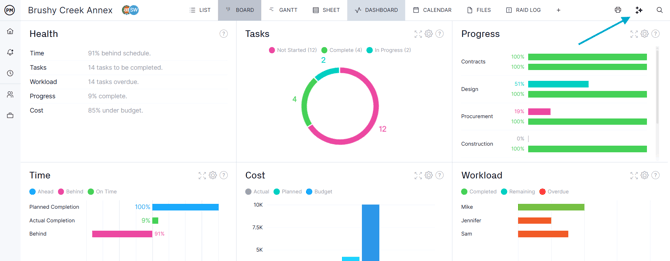
This will immediately analyse your project and respond with an executive summary, identify any risks, and provide recommendations. The exact response structure will vary from project-to-project as the AI decides what's most important to bring to your attention.
### Mastering AI Insights
Below are some recommendations for getting the most out of AI Project Insights:
- The **more data** you can provide the better, if there are plenty of tasks and each one has detailed information (status, progress, assignees, etc) then we can provide a more nuanced response.
- You can use the **project description **to provide context like the nature of the work and goals. The project manager, budget and target date are also processed.
- **Actual dates and hours** make a difference. Actual start and finish dates are automatically created when you adjust percent complete or log timesheet entries (actual hours). If you live on the Board view and don't use percent complete or timesheets then your actual dates may be out of sync.
- When analysing tasks we consider *both* the **percent complete** and the **status** (board column). If you only use the gantt view and never update the board columns, consider setting up an [automation](https://learn.projectmanager.com/automation) to change the board column to match your percent complete. Visa versa, if you only use the board columns for measuring progress, consider using [automation](https://learn.projectmanager.com/automation) to update the percent complete to match the task status.
### Current Capabilities
Please note the following limitations to our AI Project Insights feature:
- The number of monthly project insights you can run is determined by your [edition](https://learn.projectmanager.com/account-billing). You can monitor your usage on the [Account & Billing](https://learn.projectmanager.com/account-billing) page. If insights are re-run but very few changes have been made, it won't count towards your usage.
- Very small projects (fewer than 3 tasks) can't be processed, we need more information than this to provide a valuable analysis.
- Very large projects can't be analysed, the exact limit is determined by a range of factors but generally only affects projects with over 500 tasks. If you see a message about the project being too large you might want to consider splitting it into multiple smaller phases, our [project copy](https://learn.projectmanager.com/copying-a-project) feature might be useful for this.
- Only the first 500 characters of the project description and first 250 characters of the task description are analysed. If you put status updates in your descriptions consider putting the newest updates at the top.
- The system understands tasks in various languages (English, French, Spanish, Italian, German, Brazilian Portuguese, Japanese, Korean, Simplified Chinese, and Arabic) but currently it always responds in English.
- Attachments, images, comments, risks, baselines and inter-project dependencies are *not* analysed at this time.
### Privacy & Security
For information on how we keep AI private and reliable, see our [AI Privacy & Security FAQ](https://learn.projectmanager.com/ai-faq). It covers how your data is handled, compliance with regulations, capabilities of AI insights, and the controls available to your organization.
If you have any other questions, please [contact support](https://www.projectmanager.com/contact).
- [Training walkthroughs](https://learn.projectmanager.com/training-walkthroughs#main-content)
- [Setting Up Your Account](https://learn.projectmanager.com/training-walkthroughs#setting-up-your-account)
- [Resource Management](https://learn.projectmanager.com/training-walkthroughs#resource-management)
- [Team Management](https://learn.projectmanager.com/training-walkthroughs#team-management)
- [Gantt Chart](https://learn.projectmanager.com/training-walkthroughs#gantt-chart)
- [Dashboards](https://learn.projectmanager.com/training-walkthroughs#dashboards)
- [Portfolio Management](https://learn.projectmanager.com/training-walkthroughs#portfolio-management)
- [Integrations](https://learn.projectmanager.com/training-walkthroughs#integrations)
- [Getting started](https://learn.projectmanager.com/getting-started#main-content)
- [Software Basics](https://learn.projectmanager.com/getting-started#software-basics)
- [Account Basics](https://learn.projectmanager.com/getting-started#account-basics)
- [Making Your First Project](https://learn.projectmanager.com/getting-started#making-your-first-project)
- [Preferences & Notifications](https://learn.projectmanager.com/getting-started#preferences-notifications)
- [Managing projects](https://learn.projectmanager.com/managing-projects#main-content)
- [Project Management](https://learn.projectmanager.com/managing-projects#project-management)
- [Project Settings](https://learn.projectmanager.com/managing-projects#project-settings)
- [Templates, Imports & Exports](https://learn.projectmanager.com/managing-projects#templates-imports-exports)
- [Project views](https://learn.projectmanager.com/project-views#main-content)
- [Our Project Views](https://learn.projectmanager.com/project-views#our-project-views)
- [List, Board & Calendar Views](https://learn.projectmanager.com/project-views#list-board-calendar-views)
- [Gantt View](https://learn.projectmanager.com/project-views#gantt-view)
- [Sheet View](https://learn.projectmanager.com/project-views#sheet-view)
- [Risk View](https://learn.projectmanager.com/project-views#risk-view)
- [Tasks & teams](https://learn.projectmanager.com/tasks-teams#main-content)
- [Task Management Basics](https://learn.projectmanager.com/tasks-teams#task-management-basics)
- [Advanced Task Management](https://learn.projectmanager.com/tasks-teams#advanced-task-management)
- [Team Organization](https://learn.projectmanager.com/tasks-teams#team-organization)
- [Team Management](https://learn.projectmanager.com/tasks-teams#team-management)
- [Resource management](https://learn.projectmanager.com/resource-management#main-content)
- [Resource Availability](https://learn.projectmanager.com/resource-management#resource-availability)
- [Time Management](https://learn.projectmanager.com/resource-management#time-management)
- [Dashboards, reports & PPM](https://learn.projectmanager.com/dashboards-reports-ppm#main-content)
- [Dashboards](https://learn.projectmanager.com/dashboards-reports-ppm#dashboards)
- [Project Portfolio Management](https://learn.projectmanager.com/dashboards-reports-ppm#project-portfolio-management)
- [Reports](https://learn.projectmanager.com/dashboards-reports-ppm#reports)
- [Account, security & users](https://learn.projectmanager.com/account-security-users#main-content)
- [Account and Project Security](https://learn.projectmanager.com/account-security-users#account-and-project-security)
- [User Management](https://learn.projectmanager.com/account-security-users#user-management)
- [Account Management](https://learn.projectmanager.com/account-security-users#account-management)
- [Integrations](https://learn.projectmanager.com/integrations#main-content)
- [ERP / Accounting](https://learn.projectmanager.com/integrations#erp-accounting)
- [Collaboration](https://learn.projectmanager.com/integrations#collaboration)
- [Development](https://learn.projectmanager.com/integrations#development)
- [Analytics](https://learn.projectmanager.com/integrations#analytics)
- [API](https://learn.projectmanager.com/integrations#api)
- [Customer resources](https://learn.projectmanager.com/customer-resources#main-content)
- [Training Academy](https://learn.projectmanager.com/customer-resources#training-academy)
- [Listen & Learn Videos](https://learn.projectmanager.com/customer-resources#listen-learn-videos)
- [By industry](https://learn.projectmanager.com/by-industry#main-content)
- [Construction](https://learn.projectmanager.com/by-industry#construction)
- [Manufacturing](https://learn.projectmanager.com/by-industry#manufacturing)
- [Professional Services](https://learn.projectmanager.com/by-industry#professional-services)
- [Latest releases](https://learn.projectmanager.com/latest-releases#main-content)
- [Phased Releases](https://learn.projectmanager.com/latest-releases#phased-releases)
- [2026 Releases](https://learn.projectmanager.com/latest-releases#2026-releases)
- [2025 Releases](https://learn.projectmanager.com/latest-releases#2025-releases)
- [2024 Releases](https://learn.projectmanager.com/latest-releases#2024-releases)
- [2023 Releases](https://learn.projectmanager.com/latest-releases#2023-releases)
- [2022 Releases](https://learn.projectmanager.com/latest-releases#2022-releases)
- [Mobile app](https://learn.projectmanager.com/mobile-app)
[](https://www.projectmanager.com)
Get organized. Do amazing things.
[mailto:support@projectmanager.com](mailto:support@projectmanager.com)
[Login](https://software.projectmanager.com/login) | [Ask a Question](https://learn.projectmanager.com/kb-tickets/new) | [Tutorial Videos](https://www.projectmanager.com/product-videos)
```json
{
"@context" : "https://schema.org",
"@type" : "VideoObject",
"caption" : {
"@type" : "MediaObject",
"contentUrl" : "https://learn.projectmanager.com/media-transcripts/197937066281/en.vtt",
"inLanguage" : "en",
"name" : "en Captions"
},
"contentUrl" : "https://6111124.fs1.hubspotusercontent-na1.net/hubfs/6111124/AI%20Project%20Insights%20-%202025.mp4",
"dateModified" : "2026-06-03T20:49:58.229Z",
"duration" : "PT1M42.667S",
"height" : 1080,
"name" : "AI Project Insights - 2025",
"thumbnailUrl" : "https://6111124.fs1.hubspotusercontent-na1.net/hubfs/6111124/AI%20Project%20Insights%20-%202025.mp4/medium.jpg",
"uploadDate" : "2025-10-21T16:10:34.890Z",
"width" : 1920
}
```