
What’s new?
ProjectManager is enabling team leaders, members and executives to succeed in the new world of work by offering a unique product built specifically for hybrid teams, allowing them to organize, collaborate and accelerate their work regardless of the location, preferred work style or unique role of team members. How we work continues to change, since where and when we work has changed, irrevocably, in the modern work revolution of the past few years. Whether you are an agile software development team, or an IT team rolling out new products or services to a fixed timeline, or a manufacturing team tracking production and delivery with Kanban, ProjectManager is the only tool that has the flexibility, collaborative power and role-based data insights to keep everyone working together.
In support of hybrid teams, this latest product release includes a new user interface design, improved navigation, a new Zoom integration, dark mode support and exciting new ways to get the data and insights you need to manage your projects and your work together with your team, wherever they are located.
-png.png)
But this is just the start.
In the coming weeks and months, we will be rolling out new features designed specifically for teams like yours to deliver work on time and on budget, like powerful new integrations, customizable dashboards and reporting options, more flexible tasks and more agile capabilities.
Our hybrid work future is here, and we’re here to help you and your teams—wherever they are and however they work—deliver timely projects, manage time and resources, and derive the data insights you need to be successful together.
What is the Home view?
The Home view is a new way to see and address your most important action items. It’s a great first view to jumpstart your day, and a place you can return to regularly to see the latest updates on your tasks, your progress, collaboration updates, as well as key team and portfolio insights. Home offers a default view based on your role, but you can explore all the views, too. There are three distinct views of the Home view you can toggle among to gather different insights:
- My Summary is your personal snapshot of your task progress, upcoming work, projects and your Workstream of important conversations you don’t want to miss.
- Team Summary offers managers insights into the whole team’s activities and progress.
- Portfolio Summary is a new executive experience that offers data insights across your portfolio of projects, highlighting key action items and achievements from the whole team.
The new Home view also contains everything that was previously found in MyWork, so you still have a list, board and calendar view of your specific tasks, as well as your dedicated Files space.
-png.png)
What’s changed with the navigation?
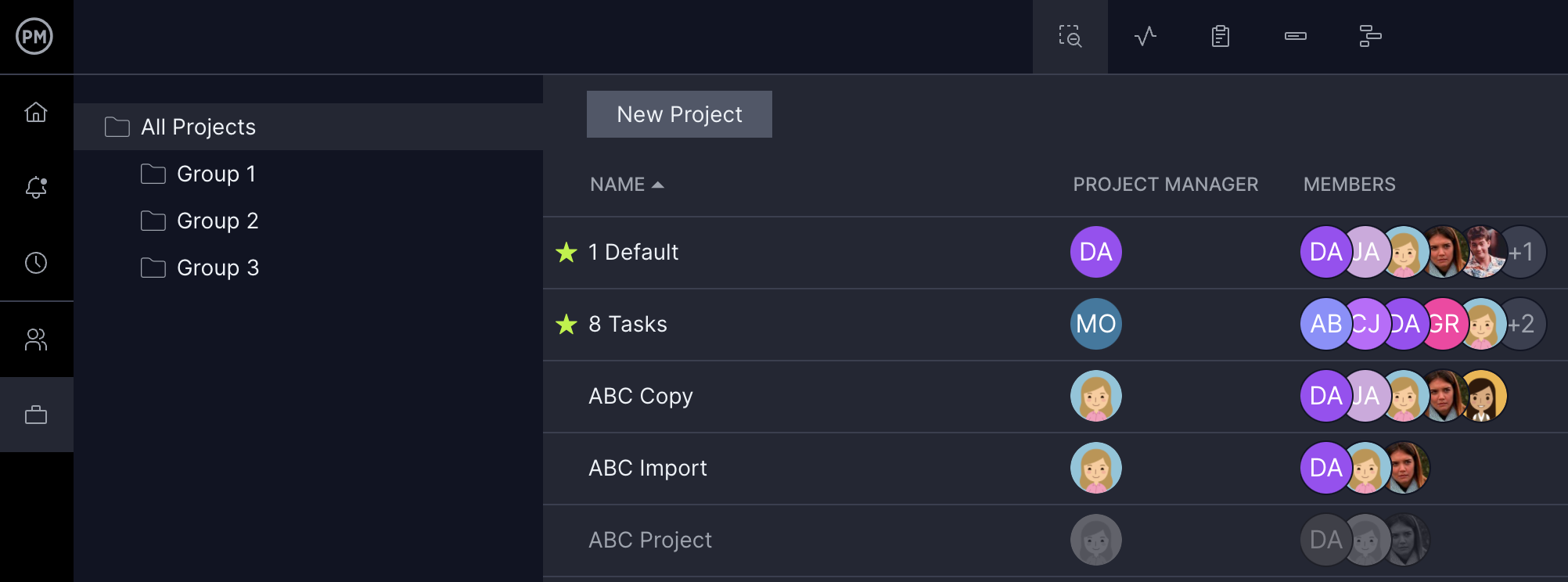
We have improved our navigation with a new extensible navigation bar on the left-hand side of the screen, as well as new icons in both the primary and secondary navigation menus. This affords more distinction between those two menus, as well as more space for each of your work views. To open and close the menu, click the PM logo to extend or collapse it, or just hover your mouse over the whole menu bar for temporary access when it’s collapsed.
At the top of the left-hand navigation bar, you’ll find all the primary navigation items, including our new Home view, Notifications, Time, Team and Portfolio view, which includes a sub-list of your projects, starting with your favorite projects. At the bottom, you’ll find the Global Add menu, the Help menu and your Account menu, which is still located under your user avatar.
We have new icons for the secondary menu for each view. The icons are pretty self-explanatory, but in case you need a little more help, there is a handy tooltip that appears when you hover over each icon to guide you to its purpose.
What is Portfolio?
We have renamed the Overview section to “Portfolio” because we feel it more accurately represents the power of our offerings there. You will still find all the same features that you know and love. When you click “Portfolio” from the left-hand navigation bar, you will see the new icons for Projects, the Portfolio Dashboard, Reports, Workload and Roadmap. Stay tuned for even more exciting Portfolio offerings we have planned for our product roadmap!
Where can I find the Project Settings menu?
We have moved the Project Settings menu under the Project name, for easier access to the important project-level functions like Workflow & Automation, favoriting a project, the Settings menu and more. Just click the project name to reveal the menu.
How do I toggle between Dark Mode and Light Mode?
We now offer dark mode to support user preference and better accessibility options. The new Dark Mode and Light Mode themes are automatically defaulted to your current OS setting, but you can change that. If you want to change the mode, you can navigate to the Account menu > Theme popup to change it.
Tell me more about the Zoom integration
We are excited to offer a new Zoom integration to deliver even more ways for teams to collaborate while working in ProjectManager. Your team will be able to start or schedule a Zoom meeting right from the application and get reminded about the meeting in your Workstream. We will be adding more functions in the coming months, and this Zoom integration is just the beginning of many new collaboration offerings. Stay tuned for more news!
What is Workstream?
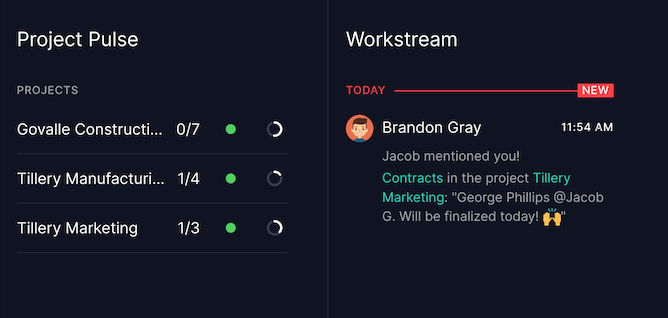
Workstream is your dedicated collaboration stream highlighting important conversations, Zoom meetings and collaboration opportunities between you and the rest of the team. Recent comments and mentions appear here, as well as meetings you’re invited to, tasks you’re assigned to and more.
What is Project Pulse?
Project Pulse is your personalized snapshot of your projects, with key insights on each project’s progress, schedule and task completion activities color-coded to alert you to any actions you might want to take. In one quick scan, you can key in on how your projects are progressing, so you can take action in seconds.
How do the new guest licenses work?
Many hybrid teams in areas like professional services work with a large number of external project stakeholders or internal sponsors who only need to stay apprised of the progress of a given project, rather than complete tasks or enter time. For those users, ProjectManager customers now have an allotment of view-only guest licenses they can distribute. Business edition customers have access to five guest licenses at no additional cost; and Enterprise edition customers may distribute unlimited guest licenses, again at no additional cost.
You can also download a PDF version of our FAQs here: April 2022 Release FAQs