---
title: Portfolio Management Features
description: Our project portfolio management software makes it easy to organize and manage your project portfolios and programs. Learn more about portfolio management.
---
[Skip to content](https://learn.projectmanager.com/portfolio-management#main-content)
- [English](https://learn.projectmanager.com/portfolio-management)
- [Español](https://learn.projectmanager.com/es/gestion-de-cartera)
English
Show submenu for translations
[Ask a Question](https://learn.projectmanager.com/kb-tickets/new)

- [ProjectManager Knowledge Base](https://learn.projectmanager.com/)
Open main navigation
Close main navigation
- [ProjectManager Knowledge Base](https://learn.projectmanager.com/)
- - [English](https://learn.projectmanager.com/portfolio-management)
- [Español](https://learn.projectmanager.com/es/gestion-de-cartera)
English
Show submenu for translations
- [Ask a Question](https://learn.projectmanager.com/kb-tickets/new)
How can we help you today?
- There are no suggestions because the search field is empty.
1. [ProjectManager Knowledge Base](https://learn.projectmanager.com/)
2. [Dashboards, reports & PPM](https://learn.projectmanager.com/dashboards-reports-ppm)
3. [Project Portfolio Management](https://learn.projectmanager.com/dashboards-reports-ppm#project-portfolio-management)
# Portfolio Management Features
## Manage your portfolio of projects with PPM tools that offer live updates to help you reach your goals.
*Portfolio features are only available on Business and above, [learn more](https://www.projectmanager.com/pricing)*
ProjectManager's portfolio features give you a centralized view across all of your projects. The five core portfolio views are: portfolio projects, portfolio dashboards, reports, workload, and roadmap.
- Portfolio projects houses all projects in one place and can be organized into groups and sub-folders.
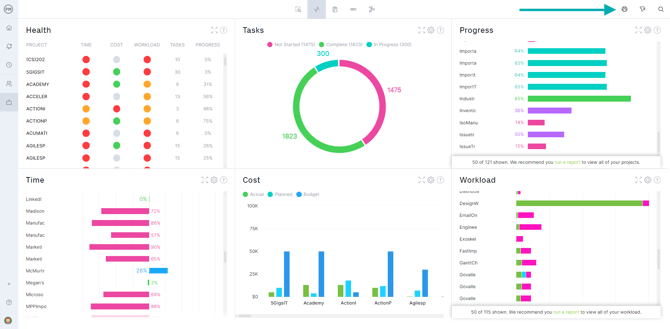
- Portfolio dashboards collect data on all projects and display six charts: health, time, cost, workload, tasks, and projects.
- Customizable reports include portfolio status, project status, project plan, tasks, timesheets, availability, workload, and variance.
- Workload offers a color-coded breakdown of each team member's planned hours.
- Roadmap shows all projects on a Gantt-style timeline view.
As project data is entered into ProjectManager, all portfolio features update automatically with real-time data.
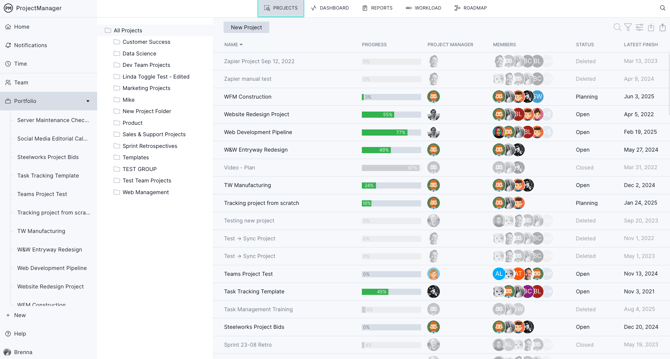
To access each portfolio view, click **Portfolio** in the left-hand navigation menu, then select the desired view using the icons at the top of the page.
### [Portfolio Projects](https://learn.projectmanager.com/portfolio-projects)
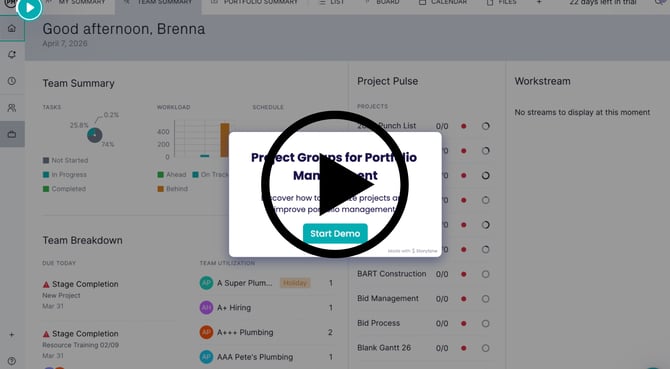
Click below for a step-by-step walkthrough on how to group projects for portfolio management.
[](https://app.storylane.io/share/zdlmvvci5uwz)
Use portfolio projects to see the name, progress, project manager, team members, status, latest finish and more for each of your projects. Click on a project name to open that project, or hover your cursor over the project name to see a three-dot menu, which you can click for even more information.
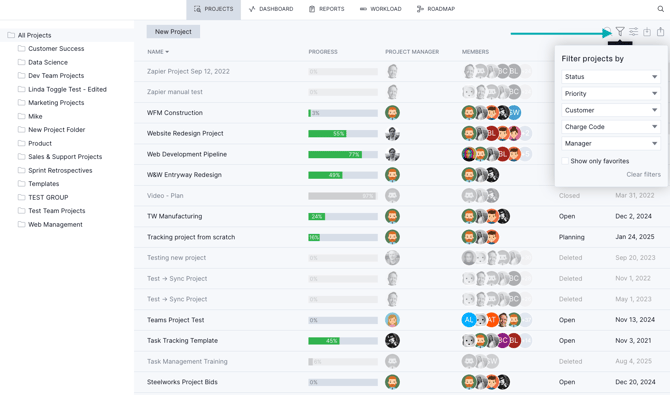
In the upper right-hand corner, you'll see:
- Search functionality
- Filters
- Settings where you can show or hide columns
- Import or export a project
### [Portfolio Dashboard](https://learn.projectmanager.com/portfolio-dashboard)
The portfolio dashboard compiles data across all of your projects in one place, giving you a high-level view of your entire portfolio — rather than a single project at a time.
To navigate to your portfolio dashboard, click **Portfolio** in the left-hand navigation menu, then select the **Dashboard** view from the icons at the top of the screen. In the upper right-hand section of this dashboard, you can filter projects by group, status, priority and more.
**Need access? [Upgrade your plan today](http://app.projectmanager.com/go/pricing).**
### [Reports](https://learn.projectmanager.com/create-report)
ProjectManager makes it easy to generate and download customizable reports in just a few clicks. Within your portfolio view, toggle to the "reports" tab where you'll see different reporting options. Customize the information included in your report before you download it as a PDF or Excel file.

### [Workload](https://learn.projectmanager.com/workload)
The workload view is a resource management tool that lets you track your team's capacity and workload across all projects.
Navigate to the workload view by clicking the **Workload** icon at the top of the portfolio section. Click a team member's total hours to reassign tasks and keep workloads balanced.

### [Roadmap](https://learn.projectmanager.com/roadmap)
The roadmap view gives you a high-level timeline showing when each project is scheduled to start and finish, along with metrics such as planned effort, actual effort, and more.
Use the icons on the upper-left side of the screen to open a particular project, print the roadmap, adjust the columns, edit the settings or view certain dates.

### Program Management
In addition to portfolio management, ProjectManager includes program management tools to help you coordinate and track related projects together.
Program managers can use tools such as Gantt charts, dashboards, cost tracking, time and team management, and kanban boards to manage their programs effectively.
Watch the video below to learn more about portfolio management in ProjectManager.
If you have questions about portfolio or program management in ProjectManager, contact our support team at support@projectmanager.com.
- [Training walkthroughs](https://learn.projectmanager.com/training-walkthroughs#main-content)
- [Setting Up Your Account](https://learn.projectmanager.com/training-walkthroughs#setting-up-your-account)
- [Resource Management](https://learn.projectmanager.com/training-walkthroughs#resource-management)
- [Team Management](https://learn.projectmanager.com/training-walkthroughs#team-management)
- [Gantt Chart](https://learn.projectmanager.com/training-walkthroughs#gantt-chart)
- [Dashboards](https://learn.projectmanager.com/training-walkthroughs#dashboards)
- [Portfolio Management](https://learn.projectmanager.com/training-walkthroughs#portfolio-management)
- [Integrations](https://learn.projectmanager.com/training-walkthroughs#integrations)
- [Getting started](https://learn.projectmanager.com/getting-started#main-content)
- [Software Basics](https://learn.projectmanager.com/getting-started#software-basics)
- [Account Basics](https://learn.projectmanager.com/getting-started#account-basics)
- [Making Your First Project](https://learn.projectmanager.com/getting-started#making-your-first-project)
- [Preferences & Notifications](https://learn.projectmanager.com/getting-started#preferences-notifications)
- [Managing projects](https://learn.projectmanager.com/managing-projects#main-content)
- [Project Management](https://learn.projectmanager.com/managing-projects#project-management)
- [Project Settings](https://learn.projectmanager.com/managing-projects#project-settings)
- [Templates, Imports & Exports](https://learn.projectmanager.com/managing-projects#templates-imports-exports)
- [Project views](https://learn.projectmanager.com/project-views#main-content)
- [Our Project Views](https://learn.projectmanager.com/project-views#our-project-views)
- [List, Board & Calendar Views](https://learn.projectmanager.com/project-views#list-board-calendar-views)
- [Gantt View](https://learn.projectmanager.com/project-views#gantt-view)
- [Sheet View](https://learn.projectmanager.com/project-views#sheet-view)
- [Risk View](https://learn.projectmanager.com/project-views#risk-view)
- [Tasks & teams](https://learn.projectmanager.com/tasks-teams#main-content)
- [Task Management Basics](https://learn.projectmanager.com/tasks-teams#task-management-basics)
- [Advanced Task Management](https://learn.projectmanager.com/tasks-teams#advanced-task-management)
- [Team Organization](https://learn.projectmanager.com/tasks-teams#team-organization)
- [Team Management](https://learn.projectmanager.com/tasks-teams#team-management)
- [Resource management](https://learn.projectmanager.com/resource-management#main-content)
- [Resource Availability](https://learn.projectmanager.com/resource-management#resource-availability)
- [Time Management](https://learn.projectmanager.com/resource-management#time-management)
- [Dashboards, reports & PPM](https://learn.projectmanager.com/dashboards-reports-ppm#main-content)
- [Dashboards](https://learn.projectmanager.com/dashboards-reports-ppm#dashboards)
- [Project Portfolio Management](https://learn.projectmanager.com/dashboards-reports-ppm#project-portfolio-management)
- [Reports](https://learn.projectmanager.com/dashboards-reports-ppm#reports)
- [Account, security & users](https://learn.projectmanager.com/account-security-users#main-content)
- [Account and Project Security](https://learn.projectmanager.com/account-security-users#account-and-project-security)
- [User Management](https://learn.projectmanager.com/account-security-users#user-management)
- [Account Management](https://learn.projectmanager.com/account-security-users#account-management)
- [Integrations](https://learn.projectmanager.com/integrations#main-content)
- [ERP / Accounting](https://learn.projectmanager.com/integrations#erp-accounting)
- [Collaboration](https://learn.projectmanager.com/integrations#collaboration)
- [Development](https://learn.projectmanager.com/integrations#development)
- [Analytics](https://learn.projectmanager.com/integrations#analytics)
- [API](https://learn.projectmanager.com/integrations#api)
- [Customer resources](https://learn.projectmanager.com/customer-resources#main-content)
- [Training Academy](https://learn.projectmanager.com/customer-resources#training-academy)
- [Listen & Learn Videos](https://learn.projectmanager.com/customer-resources#listen-learn-videos)
- [By industry](https://learn.projectmanager.com/by-industry#main-content)
- [Construction](https://learn.projectmanager.com/by-industry#construction)
- [Manufacturing](https://learn.projectmanager.com/by-industry#manufacturing)
- [Professional Services](https://learn.projectmanager.com/by-industry#professional-services)
- [Latest releases](https://learn.projectmanager.com/latest-releases#main-content)
- [Phased Releases](https://learn.projectmanager.com/latest-releases#phased-releases)
- [2026 Releases](https://learn.projectmanager.com/latest-releases#2026-releases)
- [2025 Releases](https://learn.projectmanager.com/latest-releases#2025-releases)
- [2024 Releases](https://learn.projectmanager.com/latest-releases#2024-releases)
- [2023 Releases](https://learn.projectmanager.com/latest-releases#2023-releases)
- [2022 Releases](https://learn.projectmanager.com/latest-releases#2022-releases)
- [Mobile app](https://learn.projectmanager.com/mobile-app)
[](https://www.projectmanager.com)
Get organized. Do amazing things.
[mailto:support@projectmanager.com](mailto:support@projectmanager.com)
[Login](https://software.projectmanager.com/login) | [Ask a Question](https://learn.projectmanager.com/kb-tickets/new) | [Tutorial Videos](https://www.projectmanager.com/product-videos)
```json
{
"@context" : "https://schema.org",
"@type" : "VideoObject",
"caption" : {
"@type" : "MediaObject",
"contentUrl" : "https://learn.projectmanager.com/media-transcripts/156335312488/en.vtt",
"inLanguage" : "en",
"name" : "en Captions"
},
"contentUrl" : "https://6111124.fs1.hubspotusercontent-na1.net/hubfs/6111124/Marketing%20Content/Customer%20Success%20Content/CS%20Listen%20and%20Learn/Listen%20&%20Learn%20-%20Portfolio%20Management%20v3.mp4",
"dateModified" : "2026-06-03T20:35:53.559Z",
"duration" : "PT20M23.44S",
"height" : 1080,
"name" : "Listen & Learn - Portfolio Management v3",
"thumbnailUrl" : "https://6111124.fs1.hubspotusercontent-na1.net/hubfs/6111124/Marketing%20Content/Customer%20Success%20Content/CS%20Listen%20and%20Learn/Listen%20&%20Learn%20-%20Portfolio%20Management%20v3.mp4/medium.jpg",
"uploadDate" : "2024-02-09T22:56:01.764Z",
"width" : 1920
}
```