
Released on 28 October 2025
You can now see how each column on your board is tracking at a glance. The new Board Progress indicators make it easy to spot where work is piling up or nearing completion.
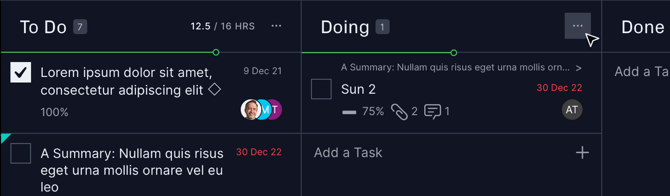
Each column header now shows:
-
Task count → The total number of tasks in the column.
-
Hours summary → If your team uses Planned Effort or Actual Effort, you’ll see these totals beside the column name (for example,
12 / 16 hrs). If actuals exceed planned, the actual value turns orange to flag an overrun. -
Progress bar → A visual indicator showing the average % complete of all tasks in the column. Hover over it to see the exact percentage.
The indicators update live as your team move or update tasks, so your board progress always reflects the latest work. Summary tasks are excluded from these calculations to keep totals accurate. If you prefer a cleaner view, you can toggle Column Progress off in the Filter & Sort menu.
This improvement gives teams a quick, visual way to understand progress without needing to open each task — especially useful for managers monitoring multiple columns or stages.
As always, if you have any questions or suggestions please contact us.