
These changes will be gradually rolled out to all customers during Q1 2025
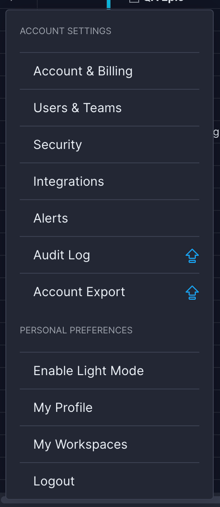
Account Menu
Clicking your name at the bottom left of any page opens the account menu.
- The menu is now grouped into Account and Personal sections
- The most commonly used options have moved higher on the list
- User Roles (formerly just called "Security") is now under Users & Teams
- The Security item in this menu takes you to account security settings like MFA & SSO
- API Keys have moved from the Account area to the Integrations area
Account & Billing View
The account area of our product has been completely rewritten to give you with more information about your account at a glance and let you make changes quickly.
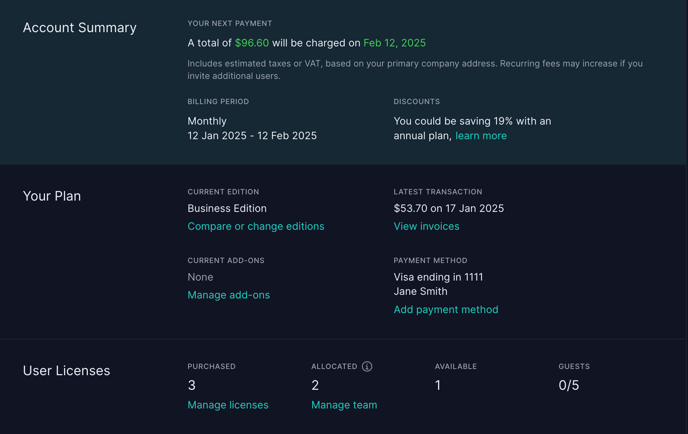
This page has been split into the following sections:
- Account Summary → The current state of your account, total cost and next billing date
- Your Plan -> Details of your plan, invoices and payment methods
- User Licenses → The licenses you've purchased and how many are in use
- Company Info → Company name, currency, billing address, workspace URL, etc
- Account Contacts → Change your account owner or add billing contacts
Users & Teams
This area is now the hub for anything related to your team, including user management, roles and holidays. The Manage Users page has a new header to show your license information at a glance.
