
Columns Enabled and Disabled
Gantt and Sheet columns are unique per user. If a user logs in for the first time, they will see the default columns. Default columns are as follows:
- Task name
- Duration
- Planned start date
- Planned finish date
- Assigned
- Percent complete
- Priority
- Actual hours
- Planned hours
- Milestone
- Status
Timeline Displayed
The timeline displayed is unique per user. The popup can be found on the Gantt ribbon to the right of the columns icon.
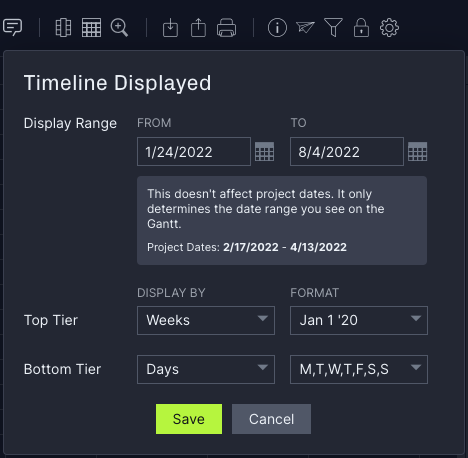
Timescale
Timescale is global and includes top tier and bottom tier as pictured above.
Filters
Filters are unique per user. Filters will reset when you log into the software.
Custom Columns
Custom columns can be seen by everyone who has access to the project. Custom columns are automatically enabled on the project but can be hidden by a unique user.
Gantt Settings
Gantt settings are unique to the user.
Portfolio Projects
Portfolio Projects columns are unique per user. The default Portfolio Projects columns are:
- Name
- Progress
- Project manager
- Members
- Status
- Latest finish
If you have questions on universal and unique user columns, please email support@projectmanager.com.