
To understand this topic, it helps to be familiar with:
- How to delete a project
- Managing project settings (including project status)
Locked Fields
When a project is closed or deleted it's locked down to preserve data integrity. However managers can change the following fields from the Portfolio screen:
-
Status → Lets you re-open the project for all members
- Status Update → Notes on the current state of the project
-
Name → Rename or prefix the project to help the team understand it
-
Folder → Organise or hide the project after closing
-
Members → Remove access for certain members for security
View a Closed Project
Project managers may want to view one of their closed project to:
- Copy an old project or create a template from it
- View the project dashboard to do a retrospective with the team
- Check historic data to compare against current projects
Clicking the name of a closed or deleted project in the Portfolio area will open it in a special view-only mode. In this mode any actions which would cause the project to change are disabled, for example you cannot:
- Create or edit tasks or risks
- Upload files
- Import new data
- View the project settings screen
However you can still:
- Access all project views (board, gantt, dashboard, etc)
- Show/hide/sort/filter task fields in any view
- Copy the project or create a template from it
- Browse and download files
- Export or print your project data
- View audit logs
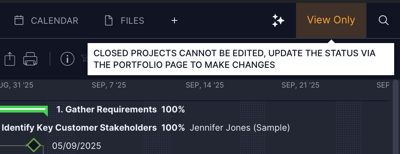
When you're viewing a closed project there will be an indicator at the top right:
Recalculating Rates
When a project is closed or deleted we lock the resource and material costs to maintain data integrity. For example if you change the hourly rate of a resource who worked on a project, that project will retain the old rate so your historical reports remain accurate.
If you try to re-open a closed or deleted project but relevant rates have changed, you have a decision to make:
- Leave the project as-is and open it in view-only mode
- Re-calculate all costs based on the current rates, then re-open it for everyone
.png?width=400&height=216&name=image%20(1).png)