
Global Search lets you instantly find tasks, projects, risks, meetings, files, and people from any page in ProjectManager. Click the magnifying glass icon at the top right, type at least three characters, and results appear grouped by type. You can also filter by type or use keyboard shortcuts to navigate results without a mouse.
How Do I Use Global Search?
Click the Magnifying Glass icon at the top right of any page to open the global search, then simply start typing. The search will start once you have typed at least three characters.
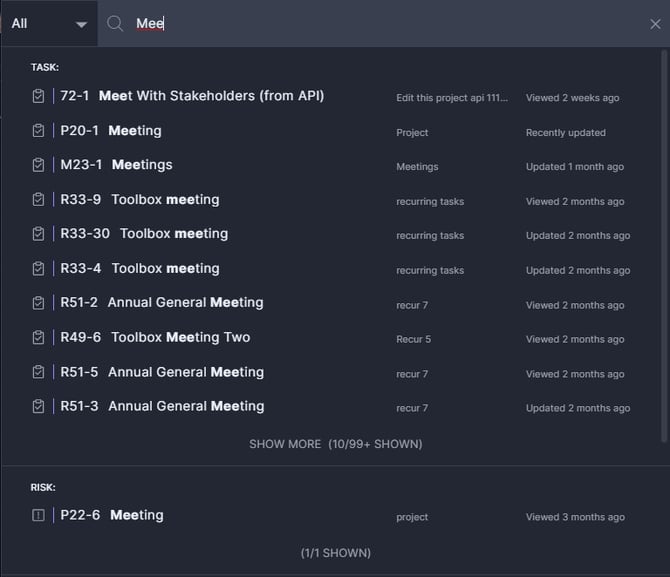
When you first open the search menu, you will see recent activity, making it easy to return to previous work items. This includes recently viewed tasks, searches performed, people you have communicated with, and projects you have edited.
How Can I Narrow My Search Results?
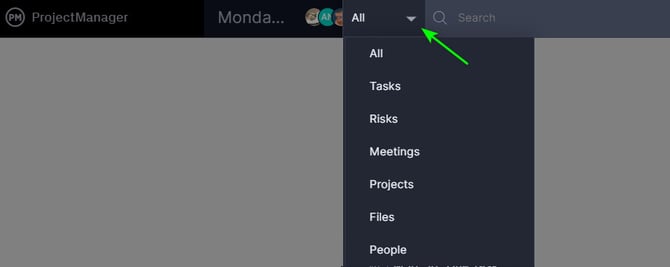
You can narrow global search results by filtering to a specific type using the All menu to the left of the search box. Search terms are matched against names and IDs across multiple item types.
The search term you type will be matched against:- The names of tasks, projects, risks, meetings, files or people
- The IDs of tasks, projects, risks, meetings
Results are grouped by type (task, risk, etc.), but you can also limit the search to just one of those types by using the All menu to the left of the search box. Click the All dropdown and select one of the available filters — Tasks, Projects, Risks, Meetings, Files, or People — to restrict results to only that type.
If there are many results, only the first 10 are shown, but you can click Show More to reveal the rest.
Keyboard Shortcuts
In addition to the other keyboard shortcuts, you can press Command+S (Mac) or Ctrl+S (Windows) "s" to quickly pull up global search functionality from any page within the software.
While searching:
- Press Tab to exit the search field, and use the arrow keys to move up and down the results.
- Press Enter on your selection from the result panel to open the associated project or card for tasks, risks, and meetings. You can also open files for download or view user profiles.
- Press Esc to exit and close global search at any stage.
Questions?
For additional assistance, contact our support team at support@projectmanager.com.