
A global admin is the highest-permission role in ProjectManager. At least one global admin must be assigned to every account, though multiple global admins can be assigned. The account holder becomes the default global admin unless another global admin downgrades their role.
Unlike the standard admin role, a global admin's security permissions cannot be changed. Only an existing global admin can assign or remove the global admin role for another user.
Accessing Role Security
To access role security, click your profile icon in the bottom-left corner of the app, then select Security. A role security dialog will open.
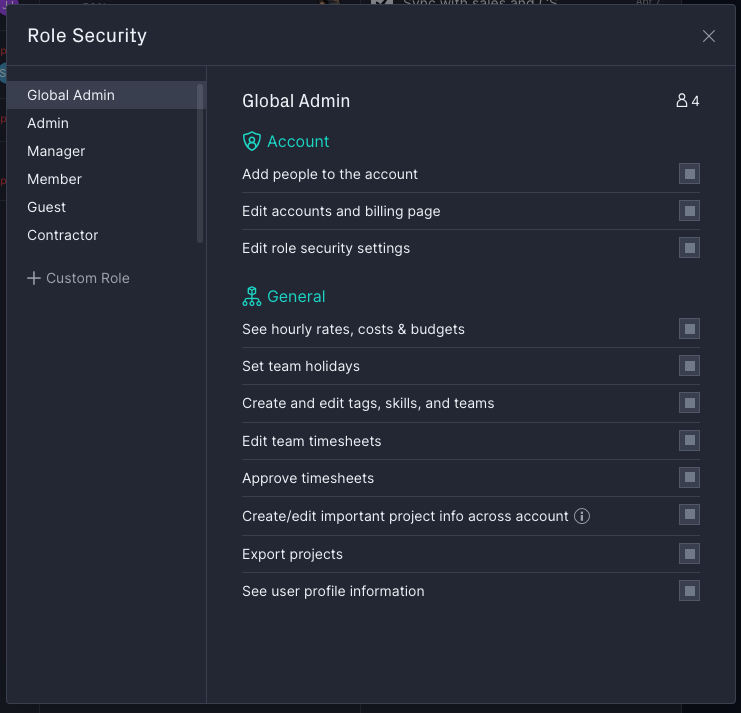
Global Admin Permissions
The global admin has all rights and permissions within the role security settings. In addition, a global admin can view all projects in the account on the portfolio projects page and choose to join any of them.
When a global admin joins a project, they receive default Manage access and cannot be downgraded to Edit or Collaborate access. The joined project then appears in the project list on the left side of the screen. Note that global admins cannot view non-project tasks they have not been assigned to.
On Enterprise plans, the global admin also has access to the audit log and account data export.
How to assign or remove the global admin role
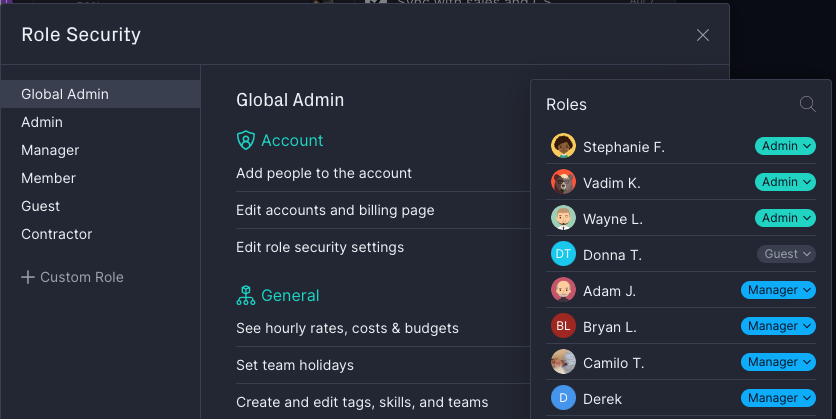
On the role security settings page, you can see which users have the global admin role. If you are a global admin, follow these steps to assign or remove the role:
- Open role security by clicking your profile icon and selecting Security.
- Locate the user you want to update.
- Toggle the global admin setting on to assign the role, or off to remove it.
- Confirm the change when prompted.
For additional help with global admin permissions, visit the ProjectManager support center or email support@projectmanager.com.