
Released 29 June 2026
QuickBooks Highlights
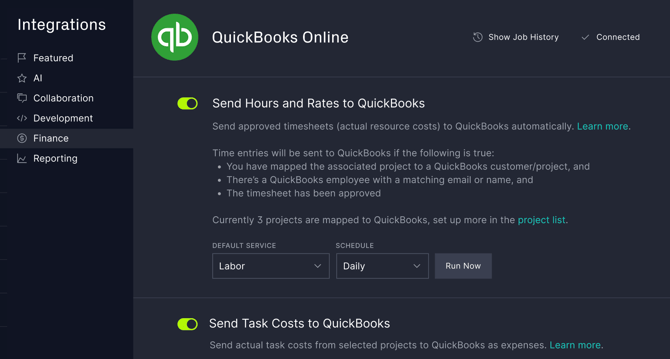
- Send Hours and Rates - Send approved timesheets and rates to QuickBooks. Employees will be automatically matched based on name or email.
- Send Task Costs - Send actual task costs like equipment, overhead or materials to the target QuickBooks accounts. You choose which projects should be synced and which QuickBooks customer or project they link to.
- Job History - Monitor integration health and troubleshoot with the job history log.
- Set and Forget - Schedule your updates to run each day, week or month.
- Compatibility - Works with or without the QuickBooks Projects module.
Learn more in our full QuickBooks guide.
Other Enhancements
-
Risk Alerts - Prevent risks from slipping through the cracks with custom risk notifications. You can now choose to be notified of changes to risks which you've created or are assigned to you. Learn more.
-
Project Versions - It's now much easier to find the right version to roll back to. Versions are grouped by date with a summary of what's changed and who made those changes.
- Unassigned Tasks - You can now choose to see only unassigned tasks on the Board and List views. This is great for agile teams needing to find the next unassigned task to take on, and for mangers to spot accountability gaps.
- Team Navigation - When you're on the Team page you can now quickly jump to related pages like Manage Users, Roles and Holidays.
If you have any questions or suggestions please contact us.