
Manage your operational plans in ProjectManager while your finance team continues working in MYOB Acumatica. Linking the two systems reduces manual updates and gives each team access to the information it needs.
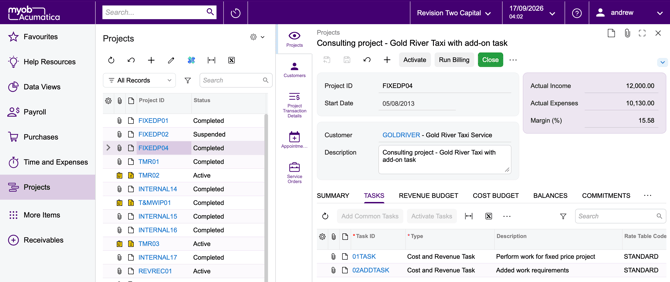
Keep projects connected
Create projects in either system and link them to share key information. Import existing MYOB Acumatica projects into ProjectManager, or create matching MYOB Acumatica projects from ProjectManager.
Linked projects share information such as dates, project ownership and task details. Individual fields have specific synchronisation rules; see the field mapping guide for directions, timing and supported updates.
Send approved time to finance
Capture and approve time in ProjectManager, then send eligible entries to MYOB Acumatica as Employee Time Activities. Team members can select an Earning Type, such as regular time or overtime.
Your finance team then completes its usual release and accounting processes in MYOB Acumatica, ProjectManager approval does not replace those steps.
Bring financial costs into your plans
View planned and actual task costs from MYOB Acumatica in ProjectManager, along with associated cost codes. You can also include open commitments in the task’s Actual Cost to understand spending already agreed to.
Costs must be associated with a matching Project Task to synchronise. While cost synchronisation is enabled, imported planned and actual costs are read-only in ProjectManager.
Choose when updates run
Enable timesheet exports and cost imports independently, with daily, weekly, monthly or on-demand runs. Use Run Now whenever you need to run a job manually. See the feature guide for configuration details.
Review Job History to check synchronisation results and investigate errors. Start with one linked project, verify the results in both systems, then enable your preferred schedules. The troubleshooting guide covers common issues and checks.
Get started
You’ll need MYOB Acumatica 25R1 or later and a ProjectManager Enterprise account with the Acumatica add-on. Contact sales to learn more. Setup also requires the appropriate permissions in both systems.
The MYOB Acumatica integration works identically to our Acumatica integration, so the following shared guides apply. References to Acumatica in these guides also apply to MYOB Acumatica:
- Getting started → Get connected, link your first projects and employees.
- Feature guide → Configure timesheet exports, cost imports and schedules.
- Troubleshooting → Review job history and resolve synchronisation issues.
- Field mapping → Understand which fields transfer and how updates work.