
Risk Management
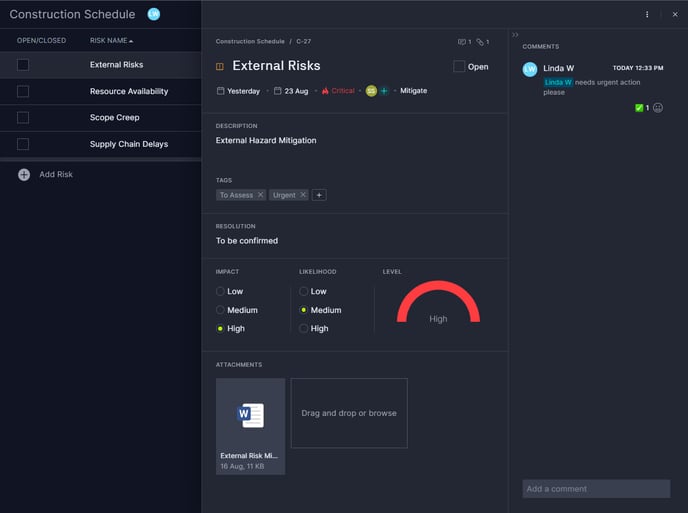
Keep your projects on track with the new risk management tab. Manage risks for each project individually to avoid unexpected impacts to project scope, costs and delivery.
- Track all of your project risks in one central hub
- Assess risk level via impact and likelihood
- Discuss risks with the team (complete with mentions, links, files, reactions and more)
- Choose a suitable response and assign it to your team to take action
- Move risks between projects to stay organized
- Customize your view by choosing which fields to display in which order
- Fully integrated with global search
View our full risk management guide for more details
Recurring Tasks
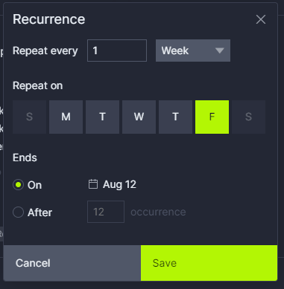 If you have a task that you'd like to repeat on a regular basis, there's no need to create each task individually. Planning your daily check-ins, weekly reviews and monthly reports just got a lot easier!
- Repeat daily, weekly, monthly or annually
- Control which days of the week or how many times a month the event repeats
- End the series on a specific date or after a number of occurrences
- Dates are automatically adjusted to match your company's work days and holidays
- Change an individual task or keep the entire series in sync
All That and More
We've been hard at work on 100+ minor improvements including:
- Workload management → Unassigned work is displayed so you to easily allocate it to your team, you can also now filter by tags, and we made the reassignment popup easier to use
- Global search → Improved search accuracy for certain terms and numbers, added a keyboard shortcut to open the search, just press S on any page (pro-tip, you can also navigate your search results with the arrow keys and select one with Enter)
- Workflow automation → Automations related to actual effort and actual duration are now synced in realtime on all product views, automations that assign tags now work correctly, and complex workflows now fit the screen better
- Account guests → Refined the experience for guests, particularly around onboarding and communicating what they can and can't do
- Task card → Actual effort panel shows currently assigned users first
- Performance → We have migrated most of our customers to our new AWS infrastructure for improved reliability and performance.
If you have questions on this release, don't hesitate to reach out to us at support@projectmanager.com.