
Some features listed below are only available on certain editions, learn more.
The account menu is the central hub of your ProjectManager account, where you can update your account settings and personal preferences.
No matter which project view you are in, you can access the account menu by clicking your avatar in the bottom-left corner of ProjectManager. The sections below outline each option in the account menu.
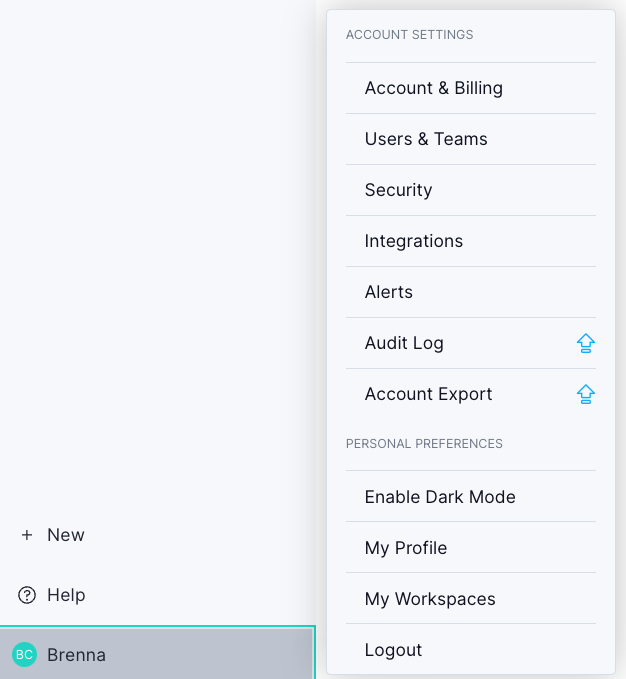
Account Settings
Account & Billing
View all your account information in one place, including payment methods, licenses, subscriptions, billing contacts, past invoices, and more.
Users & Teams
Access the users & teams page where you can add and remove users, change user roles and profiles, organize your users with teams and skills, create custom roles and manage team availability.
Security
Manage account security, including multi-factor authentication and SAML.
Integrations
Manage your integrations, activate and configure them, and also find API keys for building custom integrations.
Alerts
Set up email alerts for task changes, project changes, timesheet submissions, and more. To configure your alerts, navigate to Account Settings > Alerts.
Enterprise users also have access to Audit Log and Account Export features in this menu.
Need access? Upgrade your plan today!
Personal Preferences
Enable light/dark mode
Switch between light mode and dark mode to suit your preference.
My Profile
Update your profile picture, initial color, or choose from one of the available avatars. You can also change your password here.
My Workspaces
Switch between existing workspaces or create a new one. Workspaces are separate accounts for different departments or organizations; each has its own projects, people, and costs.
Log out
Log out of your account securely. You will continue to receive email alerts based on your alert settings.
Some integrations — such as Jira Two-Way Sync, Slack, Microsoft Power BI, and Microsoft Teams — are part of the Advanced Collaboration Bundle. Pricing may vary; contact our sales team for current pricing details.
Need access? Contact our sales team today.